느끼다
- 햅틱은 iPhone iOS 10+에서 사용할 수 있습니다.
- 설정 > 접근성 > 3D 및 햅틱 터치에서 옵션을 켭니다.
햅틱 사용 방법
- 3가지 유형의 햅틱이 있습니다.
- Impact Feedback – 사용자와 상호 작용할 때 사용(버튼 누름 등)
- 알림 피드백 – 작업의 성공 또는 실패를 알리기 위해 사용(이메일 성공 또는 실패 등)
- 선택 피드백 – 사용자가 특정 UI를 탭할 때 데이터 값이 변경됨을 알리기 위해 사용
영향 피드백
- 사용자와 상호 작용할 때 사용(키 누름 등)
- 충격 피드백에는 Light, Medium, Heavy, Firm 및 Soft가 있습니다.
- 아래 그림에서 세로선이 길수록 응답의 강도가 높고 폭이 길수록 지속 시간이 길어집니다.
- light – 작은 키 탭과 같은 가벼운 사용자 인터페이스
- 미디움 – 미디움 스위치 모션같은 UI
- 무거운 – 훌륭한 사용자 인터페이스
- rigid – 유연하거나 엄격한 사용자 인터페이스
- 소프트 – 소프트 사용자 인터페이스
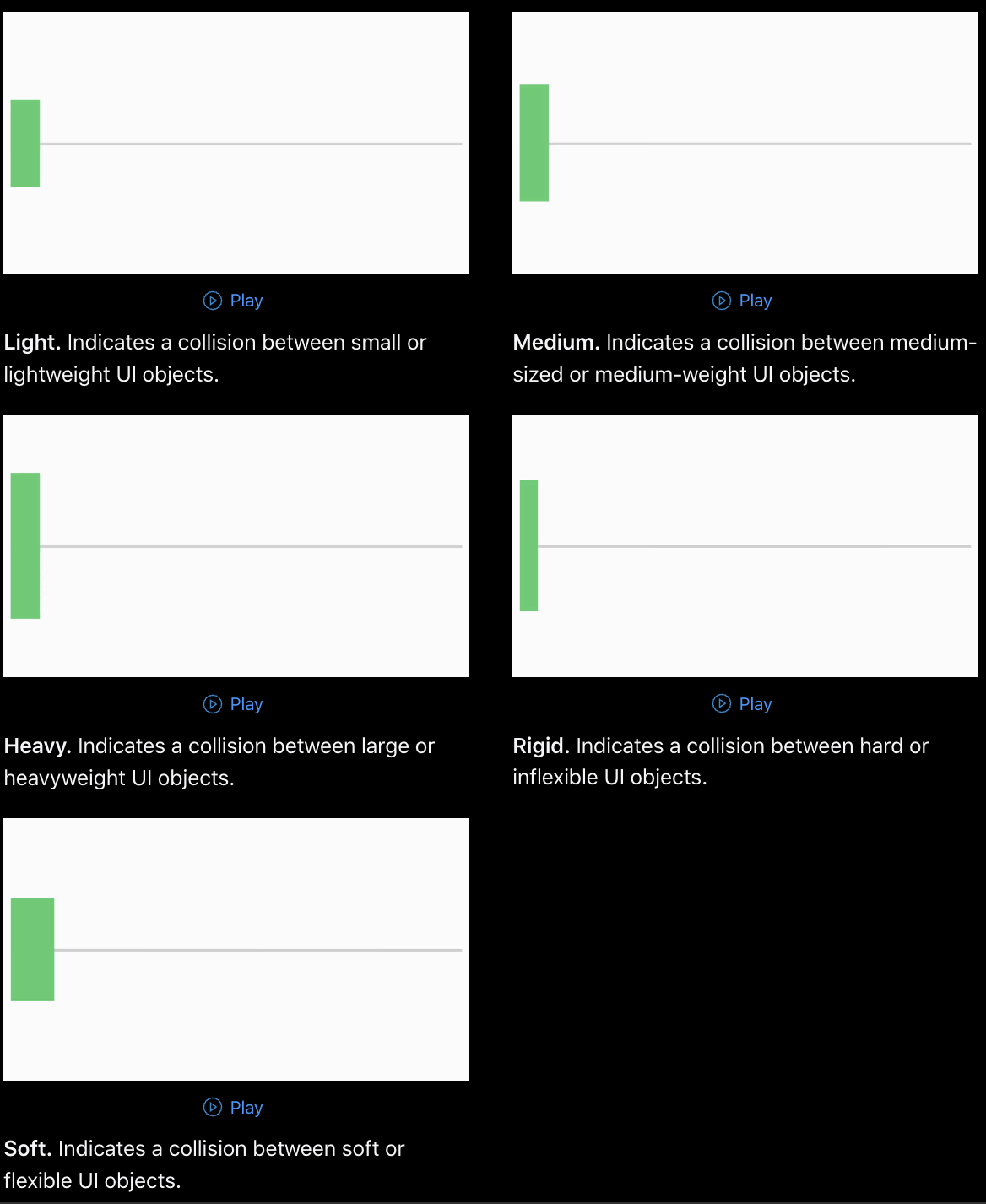
- 영향 피드백은 UIImpactFeedbackGenerator를 사용하여 생성기 인스턴스를 가져오고 해당 인스턴스의 메서드를 사용하여 햅틱을 생성합니다.
- Prepare() 생성기가 햅틱 요청에 즉시 반응하는 이유입니다.
- Prepare()의 역할: 내부적으로 이것은 햅틱 엔진이 햅틱 요청을 기다린다는 것을 의미합니다.
let style = UIImpactFeedbackGenerator.FeedbackStyle.light // medium, heavy, rigid, soft
let generator = UIImpactFeedbackGenerator(style: style)
generator.prepare()
generator.impactOccurred()
알림 피드백
- 작업의 성공 또는 실패를 알리는 데 사용됩니다(예: 이메일의 성공 또는 실패).
- 알림 피드백에는 성공, 경고 및 오류가 포함됩니다.
- 아래 그림에서 세로선이 길수록 응답의 강도가 높고 폭이 길수록 지속 시간이 길어집니다.
- 성공: 점점 더 격렬해지는 반응
- 경고: 점차 쇠약해지는 반응
- 오류: 벨소리가 여러 번 울림
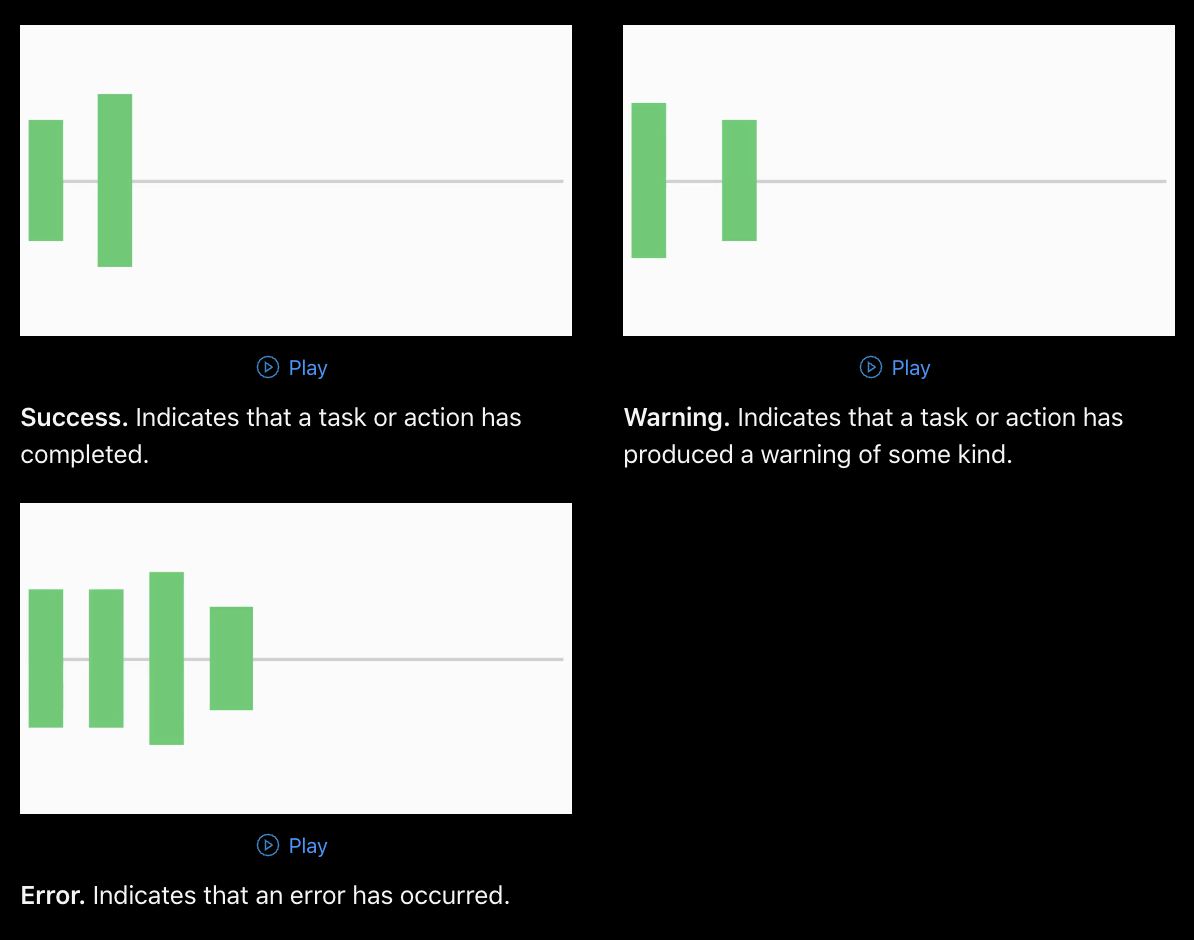
- 알림 피드백은 UINotificationFeedbackGenerator를 사용하여 생성기 인스턴스를 가져오고 해당 인스턴스의 메서드를 사용하여 햅틱을 생성합니다.
let type = UINotificationFeedbackGenerator.FeedbackType.success // .error, .error
let generator = UINotificationFeedbackGenerator()
generator.prepare()
generator.notificationOccurred(type)
선택 피드백
- 선택 피드백 – 사용자가 특정 UI를 탭할 때 데이터 값이 변경됨을 알리기 위해 사용
- 매우 짧은 기간과 약한 반응을 의미하는 한 가지 유형만 있습니다.

'추천 관련글,
![[알고리즘이론] 파이썬 자료구조](https://file.foodle.kr/wp-content/plugins/contextual-related-posts/default.png "[알고리즘이론] 파이썬 자료구조")
- 알림 피드백은 UISelectionFeedbackGenerator를 사용하여 생성기 인스턴스를 가져오고 해당 인스턴스의 메서드로 햅틱을 생성합니다.
let generator = UISelectionFeedbackGenerator()
generator.prepare()
generator.selectionChanged()
3연속 사용
- 싱글톤처럼 사용하기 위해 enum 타입의 서비스로 정의합니다.
enum HapticService {
    case impact(UIImpactFeedbackGenerator.FeedbackStyle)
    case notification(UINotificationFeedbackGenerator.FeedbackType)
    case selection

    func run() {
        switch self {
        case let .impact(style):
            let generator = UIImpactFeedbackGenerator(style: style)
            generator.prepare()
            generator.impactOccurred()
        case let .notification(type):
            let generator = UINotificationFeedbackGenerator()
            generator.prepare()
            generator.notificationOccurred(type)
        case .selection:
            let generator = UISelectionFeedbackGenerator()
            generator.prepare()
            generator.selectionChanged()
        }
    }
}

...

@objc
private func tapButton() {
    HapticService.impact(.light)
}
* 전체 코드: https://github.com/JK0369/ExHaptic
* 참조
https://developer.apple.com/documentation/uikit/uinotificationfeedbackgenerator
https://developer.apple.com/design/human-interface-guidelines/patterns/playing-haptics/
https://developer.apple.com/documentation/uikit/uiimpactfeedbackgenerator